Friday, March 16, 2012

Hosting Offer PSD Template ( free template)


Hosting Offer PSD Template

has the following features:

Template Type
  • PSD Template

Category
  • Business

Files Included
  • .PSD File

Software Required
  • Adobe Photoshop CS+

Uncompressing Software
  • WinZip 9+ (Windows)
  • Stuffit Expander 10+ (Mac)


Business Online PSD Template (free template)


Business Online PSD Template

has the following features:

Template Type
  • PSD Template

Category
  • Business

Files Included
  • .PSD File

Software Required
  • Adobe Photoshop CS+

Uncompressing Software
  • WinZip 9+ (Windows)
  • Stuffit Expander 10+ (Mac)


How To Add Blogger Cool Popular Posts Widget With Zoom Effect Using CSS V2.....


1.Login to your blogger dashboard--> Design- -> Edit HTML

2.Scroll down to where you see ]]></b:skin> tag .

3.Copy below code and paste it just After ]]></b:skin> tag
<style type='text/css'>
.PopularPosts ul li {background: none repeat scroll 0 0 transparent;float: left;list-style: none outside none;margin: 5px !important;padding: 0 !important;}
.PopularPosts ul li img {padding:0;-moz-border-radius: 5px;-webkit-border-radius: 5px;border-radius: 5px;-webkit-transition: all 0.3s ease;-moz-transition: all 0.3s ease;transition: all 0.3s ease;border: 2px solid #CCC;height: 80px;width: 80px;}
.PopularPosts ul li img:hover {border:2px solid #BBB;-moz-transform: scale(1.2) rotate(-1090deg) ;-webkit-transform: scale(1.2) rotate(-1090deg) ;-o-transform: scale(1.2) rotate(-1090deg) ;-ms-transform: scale(1.2) rotate(-1090deg) ;transform: scale(1.2) rotate(-1090deg) ;}
</style>
Note: Please You first Add Popular Posts widget to Your Blogger Sidebar. (Blogger widgets list..)

4 Now Click on Save Template,

5.Now Set Settings Your Popular Posts Widget , Like this,


6. Now Save Your Popular Posts Widget and You are Done..

Cheers.

How To Disable Right Click in Blogger or Webpage....


1.Login to your blogger dashboard--> Desing- -> Page Elements-->Add a Gadget-->Html/javascript and paste the above javascript code

<SCRIPT language=JavaScript>
<!-- http://www.spacegun.co.uk -->
var message = "function disabled";
function rtclickcheck(keyp){ if (navigator.appName == "Netscape" && keyp.which == 3){ alert(message); return false; }
if (navigator.appVersion.indexOf("MSIE") != -1 && event.button == 2) { alert(message); return false; } }
document.onmousedown = rtclickcheck;
</SCRIPT>
Note: Replace function disabled your text.

2.Now Save Html/javascript

Your Are Done

HACK ANY FACEBOOK ACCOUNT USING FACEBOAX

Faceboax (Facebook Hack)

I found this and i want to share this to you guys... Haven't tested it because rapidshare won't allow me to download the file.
Screenshots:

Sample Video:
Download Link:

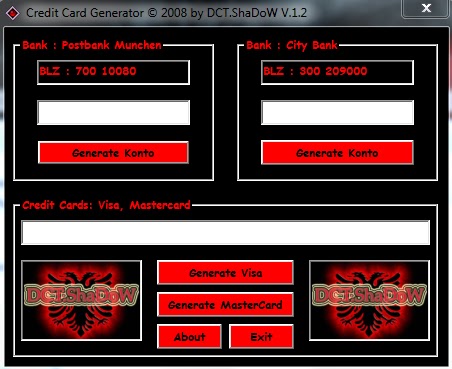
CREDIT CARD GENERATOR.....

HOW TO UNLOCK HUAWEI E153u-2 ( IT IS FREE)

                                    
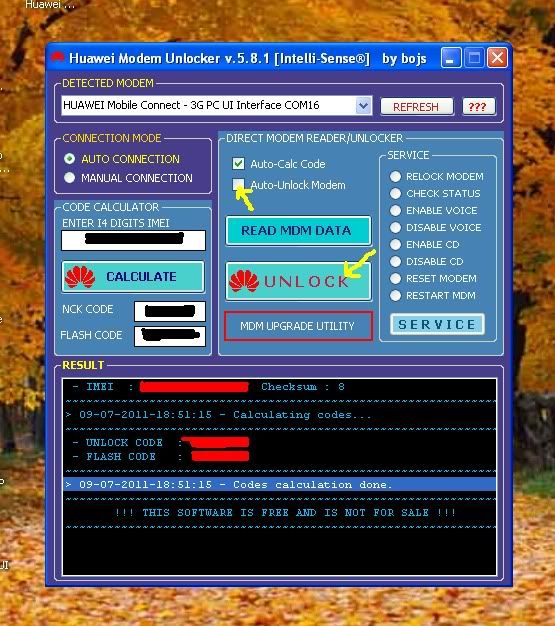
tep 1: Download first the Huawei-Modem-Unlockerv5.8.1

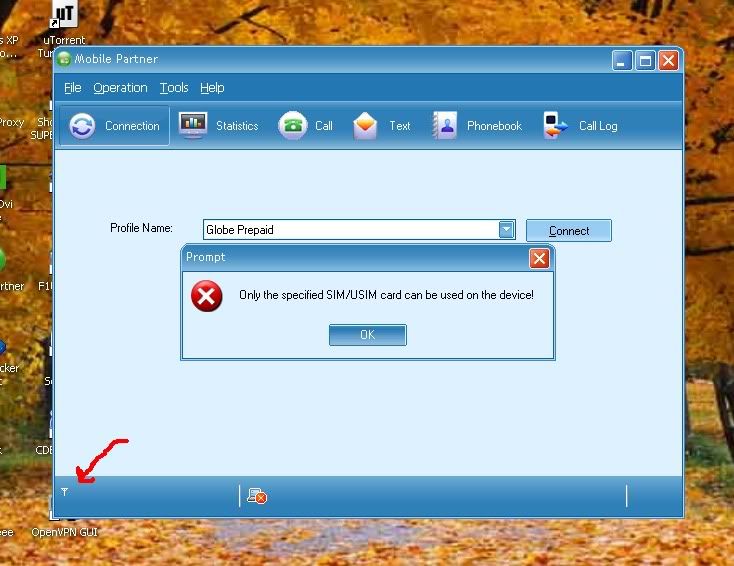
Step 2: Insert/connect your Globe Tattoo stick with any sim card (other than Globe) to your lappy or computer. Dashboard* will appear on the screen (pic below). Notice that on the lower left of mydashboard, i have no smart signal or smart site bar. Click "Ok" and "x" on the upper right corner of the dashboard to close it.
*my dashboard maybe looks different to you guys 'coz i upgraded it to replace Globe Tattoodashboard =)


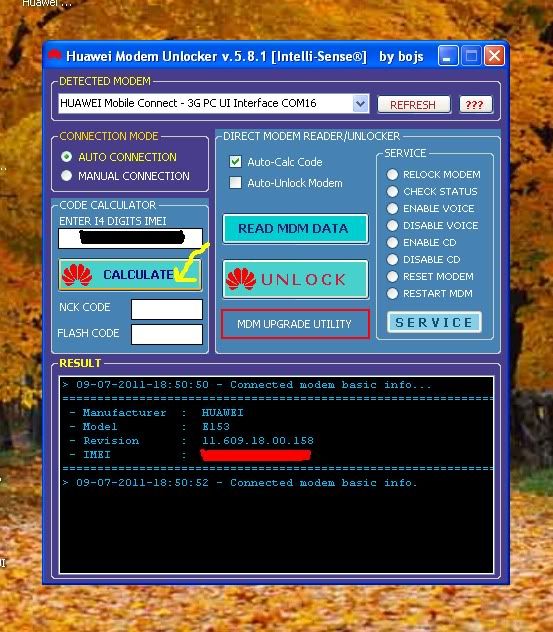
Step 3: Now, open Huawei Modem Unlocker . It should detect your modem/tattoo stick automatically. If not, then choose "Auto Connection" on the connection mode. Close the huawei modem unlocker & open it again.


Step 4: Once your modem/tatto0 stick has now been detected, click the "Calculate" button to read the nck & flash code.

         
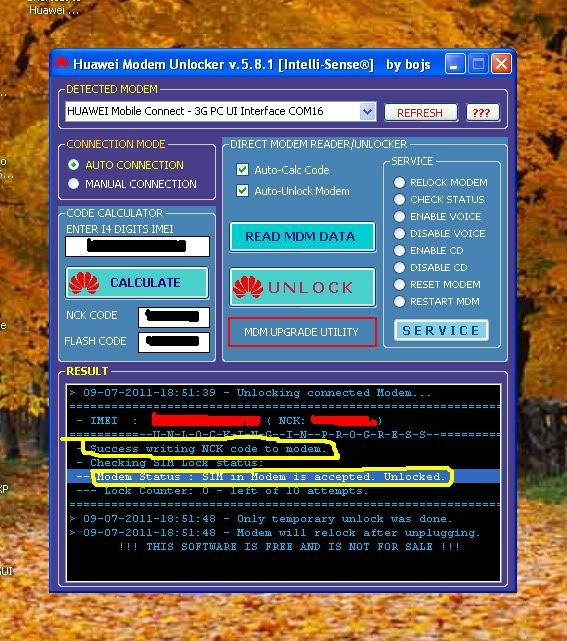
Step 5: Check the "Auto-Unlock MOdem" on the direct modem reader/unlocker & click the "UNLOCK" button.

           
Step 6: On the RESULT-Modem Status (see pic below), when it says "SIM in Modem is accepted. Unlocked" means you have successfully unlocked your modem/tattoo stick and you can now connect to the sim card network you used.


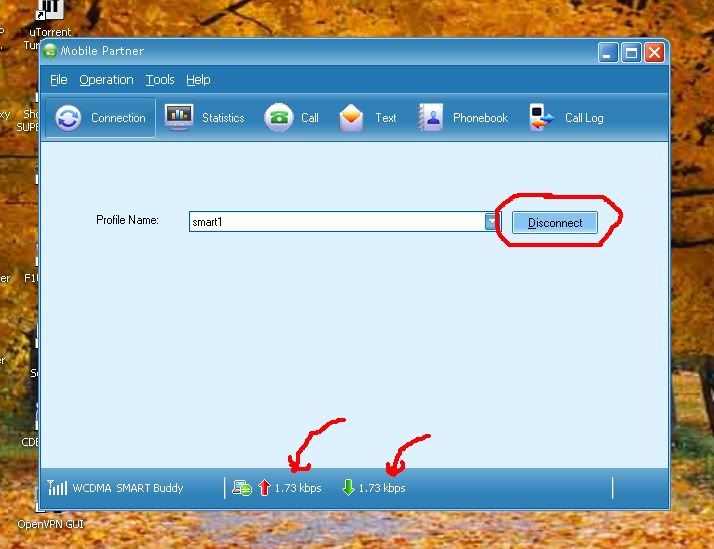
Step 7: Close the Huawei Modem Unlocker & click or open the Globe Tattoo icon to display thedashboard again. As you can see (pic below), i have now smart signal or smart site bar on the lower left of my dashboard.
                              
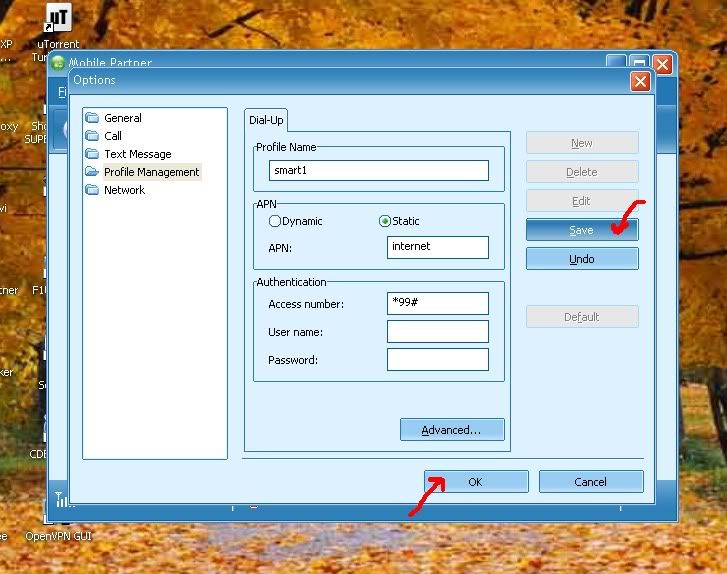
Step 8: Now, configure your smart settings to connect (go to tools > options > profile management > & click the "new" button).


Step 9: Click connect & you are now DONE!

                                      
#This Huawei Modem Unlocker will unlock your modem/tattoo stick temporarily & will relock after you unplug it from your lappy/computer.